

Event Snapshot
Event photos sold while the guests are still there.
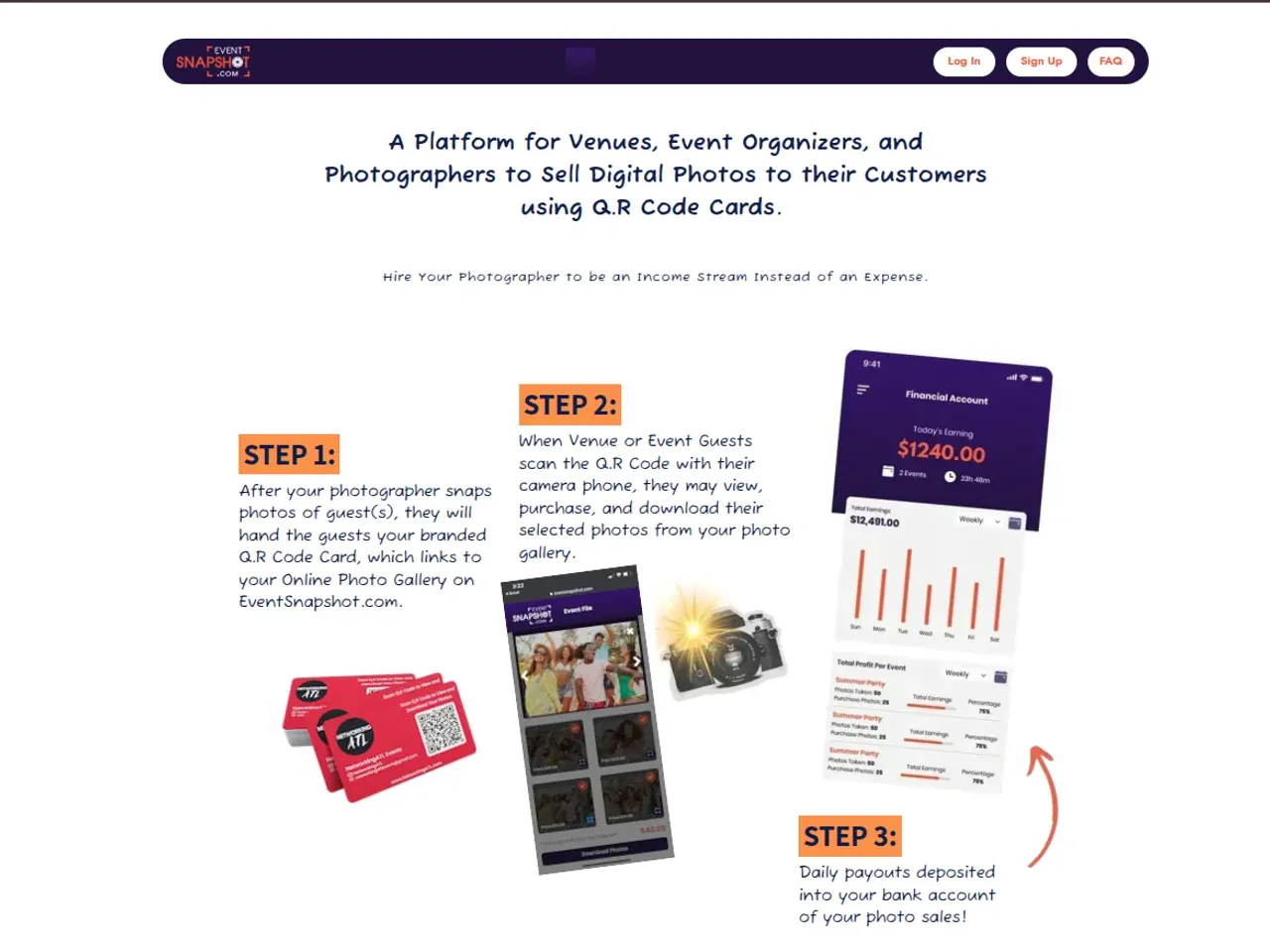
A guest scans a QR code, finds their photos, pays, and downloads them in one flow on their own phone.
- Client
- Event Snapshot
- Industry
- Event photography
- Built for
- Live events: weddings, corporate functions, parties, public events
- Engagement
- Web app with integrated payments · Full-stack development
Event Snapshot is an event photo sales platform that Hashlogics built as the full-stack developer. A guest scans a QR code at the event, finds their photos, pays by card, and downloads them on their own phone. It fixes a sales problem that has nothing to do with photography: the guest who'd gladly buy a picture is gone an hour after the shutter closes. A late gallery link reaches almost none of them.
The problem we set out to solve.
Guests left before any sale could happen, and follow-up after the event reached very few of them.
A guest had no way to find their own photos without the photographer in the middle.
Delivery meant sorting images by hand and sending them to each buyer.
Payment was collected separately, per person, with nothing tying it to the download.
Nothing kept one event's photos apart from the next event's.
The cost was revenue lost on photos that had already been taken and edited.
What success needed to look like
- A guest goes from scan to downloaded photo unaided, on their own phone.
- No guest has to create an account.
- No unpaid photo can be downloaded.
- No paid photo needs manual delivery.
- One QR code per event is the only way in.
How we delivered it.
- 01
Map both sides of the sale
We mapped the guest's buying path and the photographer's event workflow.
- 02
Design for one hand at a busy event
Guest screens were made for a phone held in one hand. Gallery pages stay light, so they load quickly on venue Wi-Fi and mobile data.
- 03
Build the paid-download chain
Galleries, checkout, download entitlements, and the photographer dashboard went in as one connected system. The client reviewed each working increment in regular check-ins.
- 04
Test the money path end to end
Testing covered the whole purchase flow, payment confirmation, and the gate on downloads.
- 05
Release, then stay on
After the production release and the first live events, we kept shipping fixes and improvements.
How the event photo sales platform works.
Event Snapshot is a mobile-first web app that opens straight from a QR scan, so there's nothing to install. Guests browse that event's gallery, pick their photos, pay by card, and download the full-resolution files right away. A separate dashboard sits behind it. There, the photographer creates events, uploads photos, gets a QR code to hand out or show at the venue, and reviews sales.
One rule holds it together: only a confirmed payment creates a download entitlement. Checkout and delivery check that entitlement on the server, not in the browser, so an unpaid photo never downloads. Card details stay with the payment gateway and never touch the platform. The photographer signs in to reach the dashboard, and each QR code opens one event's gallery and no other.
- UploadThe photographer adds photos to an event.
- ScanA QR code opens that event's gallery.
- Select and payThe guest picks photos and pays by card.
- ConfirmA confirmed payment grants the download entitlement.
- DownloadFull-resolution files are released for the paid photos.
Each QR code resolves to a single event's gallery, and guests never need an account.
Application
- Mobile-first responsive web app
- Photographer dashboard
- Event, gallery, checkout and entitlement services
Data and hosting
- Relational database
- Object storage for the photo library
- Cloud hosting
- Images served from storage
Integrations
- Card payment gateway (Stripe Connect)
- QR-code generation
Showing photos is only part of a build like this. Two things matter more. A payment has to release the right files and nothing else. And a whole event's guests may scan the code at once. So every download is checked against a paid entitlement on the server, and photos are served from cloud storage instead of through the app. If you sell anything at a live event, that's the moment your checkout has to hold.
